
Your first AI answer with sources
In this tutorial you will ask about a message already in CercaPosta and compare the AI answer with the original source. You will use information whose answer you already know: the aim is to learn how to check citations, not to measure model quality across your whole archive.
Before you begin
You need an account whose plan includes AI chat, the feature enabled and a message authorised for AI use. Your installation’s AI services must be configured. If chat is unavailable, check AI preferences or contact your administrator.
Choose an email with a simple, unambiguous fact, such as a meeting date. Open it using classic search first and note the exact information.
1. Ask for one fact
Open AI chat and ask for that fact, including a name or reference present in the message. An example question is: “What is the date of the Aurora project meeting? Include the source.” Use your own project name: Aurora is a fictional example.
2. Observe the answer and references
Wait for the response to finish. Look for citations associated with its statements. If no relevant source is found, check the name you used and whether the message is authorised for AI use. A missing answer does not prove that a document does not exist.
3. Open the citation
Open the reference and compare the date with your note. Check the context too: an initial proposal and a later confirmation may give different dates. A useful citation must support the particular statement you are checking.
4. Refine the question
If there are several appointments, specify the period or participant and repeat the check. You have completed the exercise when you can trace the answer to the original passage and recognise a possible inconsistency.
Watch a real answer being checked
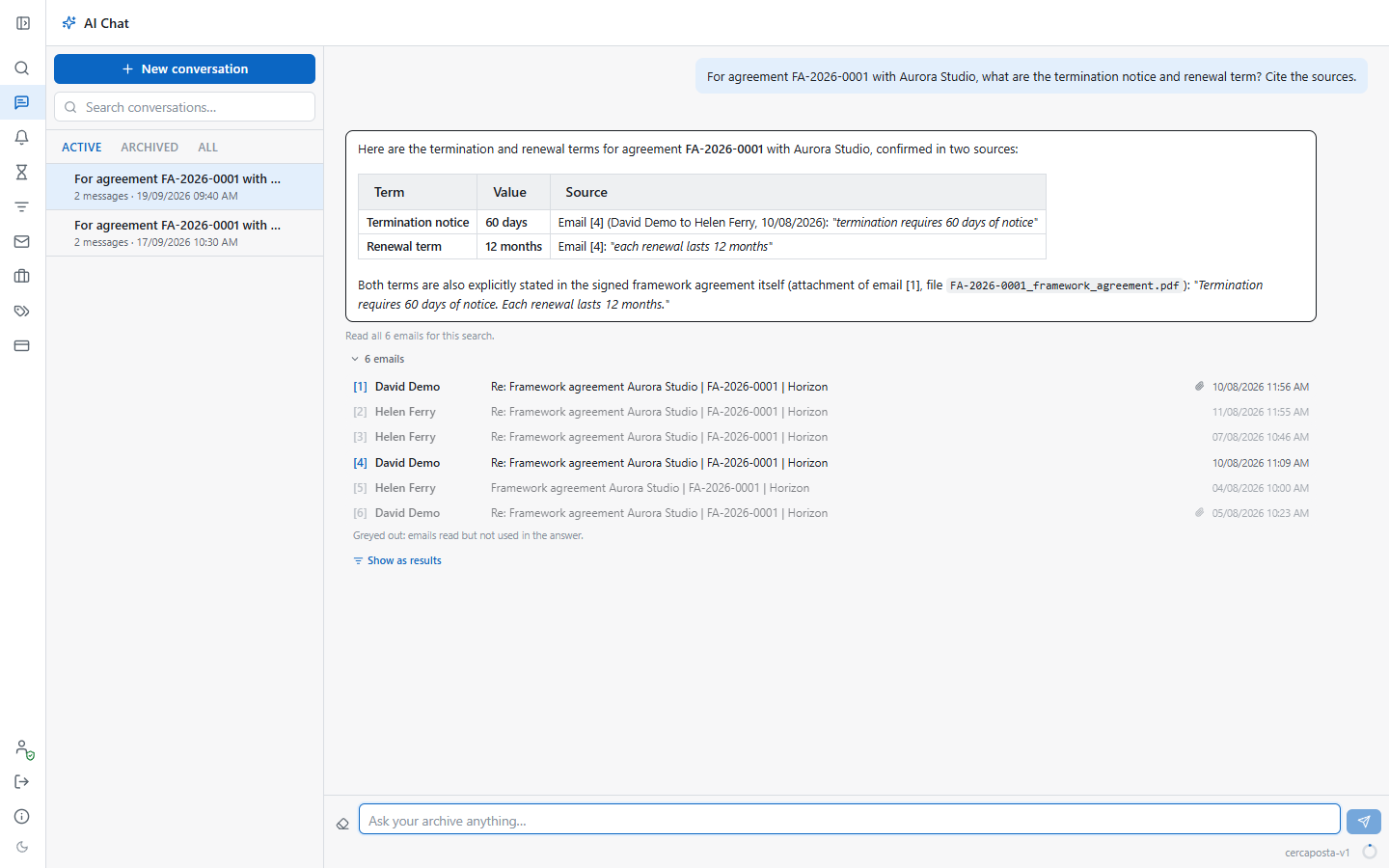
In the demo account we ask: “For agreement FA-2026-0001 with Aurora Studio, what are the termination notice and renewal term? Cite the sources.”
The video shows the question being typed and submitted, followed by the answer appearing as it is streamed by the app. It states 60 days and 12 months. We then open source [1] and preview the attached agreement PDF to compare its wording with the answer.
Typing is accelerated and the wait is reduced to less than one second. The response text and its progressive updates are those actually received during this recording; the pauses for reading and checking the source remain visible.
To repeat the exercise, open AI Chat, ask about one of your documents, wait for the answer and open the relevant source. Wording, source numbering and generation time may change between runs. Questions consume tokens according to your plan.
Read the video transcript
Ask CercaPosta about the agreement’s notice period and renewal term.
Send the question. CercaPosta searches the archive and writes an answer with sources.
The answer specifies sixty days of notice and a twelve-month renewal.
Open the citation to view the message used as a source.
Compare the source text with the answer, checking both the notice period and the renewal term.
View screenshots of the steps
Learn more
Read how AI uses and cites sources. This single exercise is not an accuracy guarantee for other documents or questions.