---
title: "Search operators"
description: "Syntax and examples for senders, recipients, dates, folders, attachments and message sizes."
language: en
canonical: https://cercaposta.it/en/docs/reference/search-operators/
updated: 2026-09-19
publisher: WpWeb S.r.l.
diataxis: reference
---
# Search operators
The CercaPosta search box combines free text and operators. Operators restrict fields such as sender, date, folder or attachments; free text searches indexed content. You can build the same criteria with the filter form. Examples use demonstration data that you should replace with values from your archive.
## Syntax
Use `operator:value`. Put values containing spaces in quotation marks. Dates use `YYYY-MM-DD`. English aliases are also accepted in the Italian interface.
| Criterion | English / Italian operator | Example |
| --- | --- | --- |
| Sender | `from:` / `da:` | `from:smith` |
| Recipient | `to:` / `a:` | `to:customer@example.test` |
| Copy | `cc:` | `cc:smith` |
| Subject | `subject:` / `oggetto:` | `subject:"framework agreement"` |
| Attachments | `has:` / `ha:` | `has:pdf` or `has:attachment` |
| Start date | `after:` / `dopo:` | `after:2026-01-01` |
| End date | `before:` / `prima:` | `before:2026-06-30` |
| Folder | `folder:` / `cartella:` | `folder:"Customers/Aurora"` |
| Shared folder | `shared:` / `condivisa:` | `shared:"mario/Customers"` |
| Tag | `tag:` | `tag:contracts` |
| Message size | `size:` / `dim:` | `size:>5M` |
| Individual attachment size | `attachment:` / `allegato:` | `attachment:>10M` |
The account filter is available in the filter form. To select a source unambiguously, use the value offered by the interface.
## Combining criteria
`from:smith has:pdf contract` searches for “contract” in messages from the selected sender that have a PDF. Adding different criteria narrows the results.
Multiple `folder:` operators use **OR**: matching any selected subtree is sufficient. Multiple `tag:` operators also select any one of the tags, not necessarily all of them.
## Sizes and attachments
Sizes accept comparisons such as `>`, `<`, `>=`, `<=` and `=`. `K`, `M` and `G` use multiples of 1024. `size:` concerns the whole message; `attachment:` requires at least one attachment to meet the limit.
`has:cv` recognises the résumé category when available; it is not just a search for “cv” in a filename. Embedded images and signature logos do not count as ordinary attachments.
## If a search is too restrictive
Remove one filter at a time and check the folder scope. Results depend on indexed messages and your permissions. For a guided exercise, see [your first search](https://cercaposta.it/en/docs/tutorials/first-search/).
## Example: combine criteria in the filter form
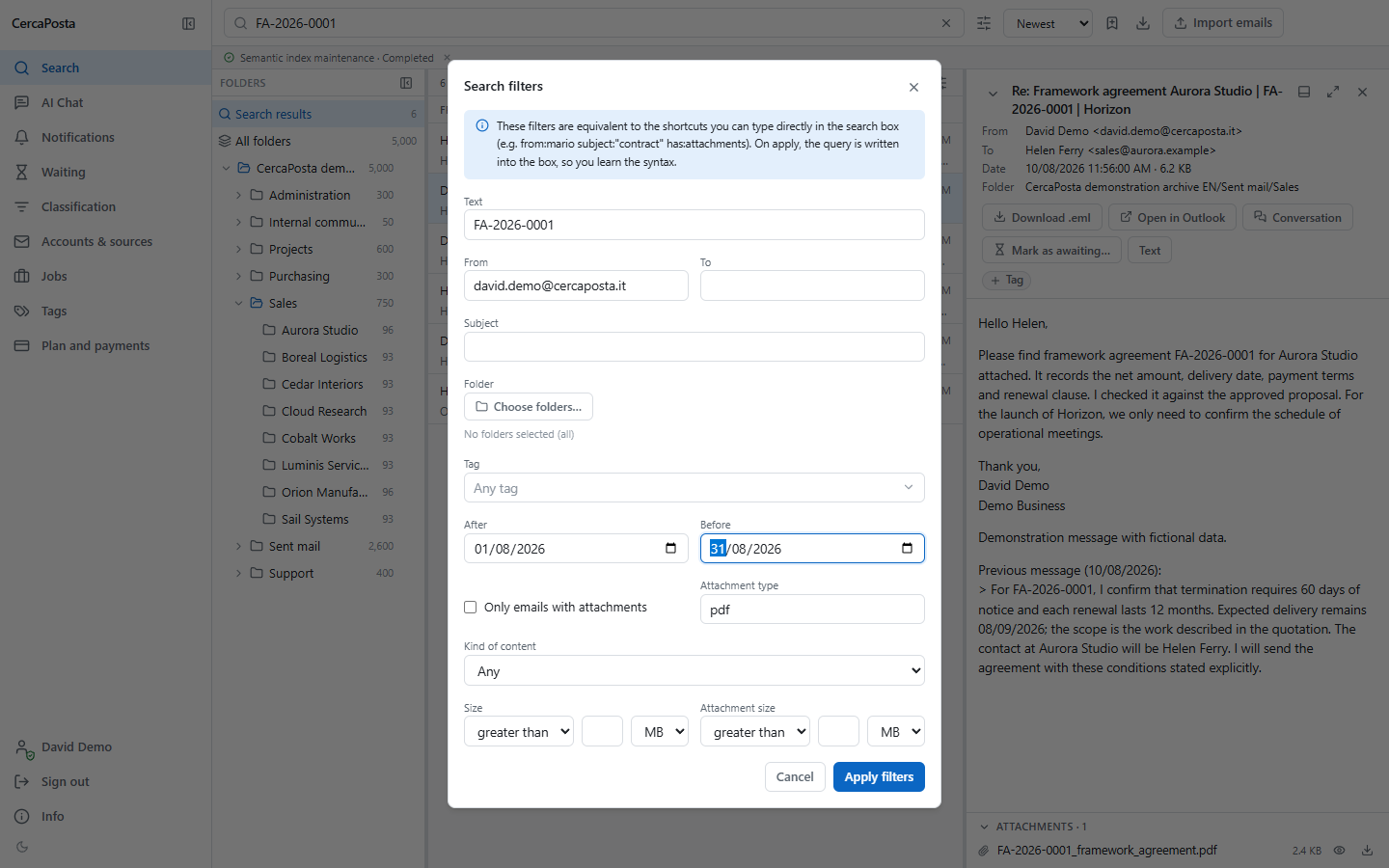
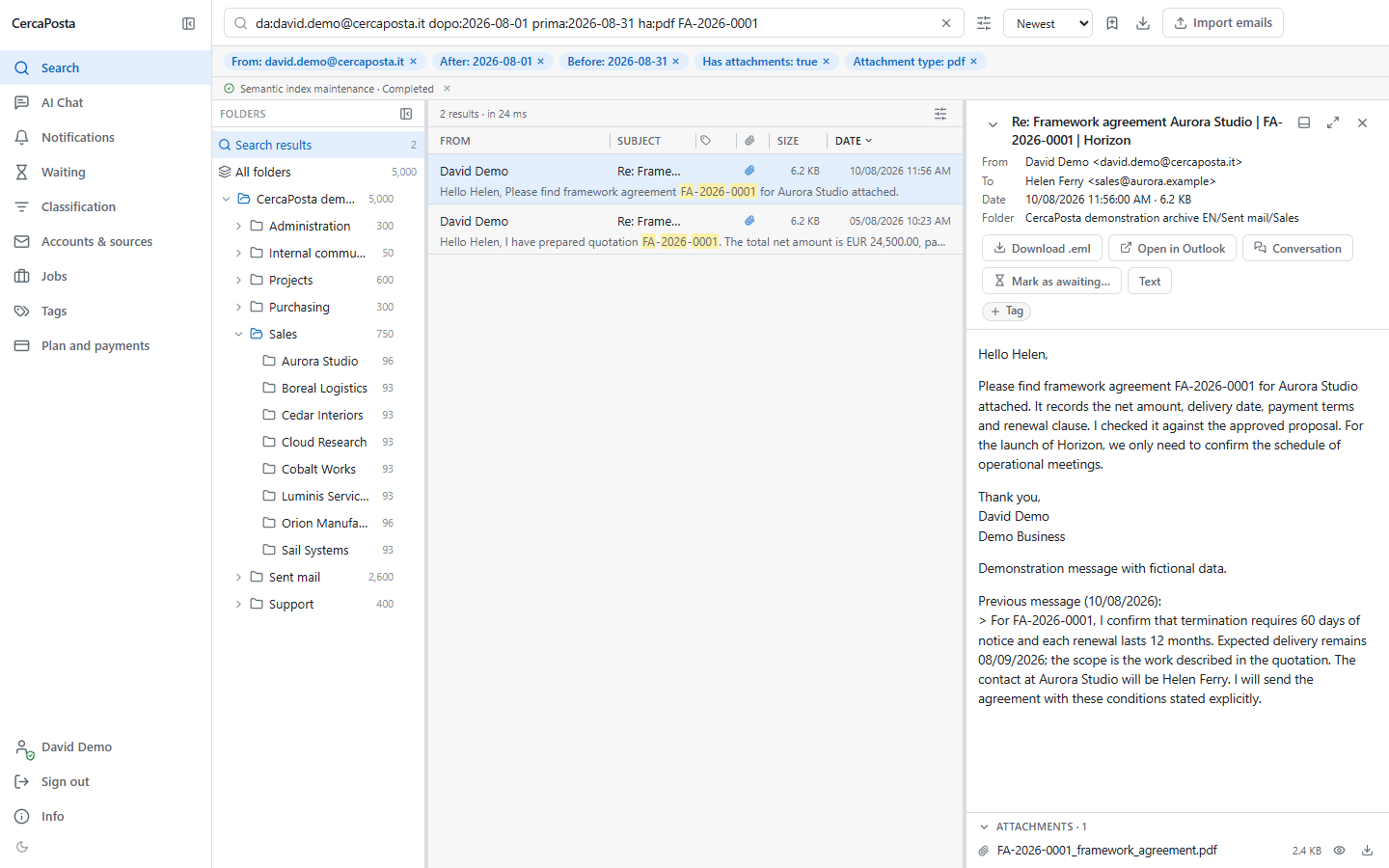
The filter form lets you set the same criteria without typing operators. In this example we search for `FA-2026-0001`, then select sender `david.demo@cercaposta.it`, attachment type `pdf` and the period from 1 to 31 August 2026. **Apply filters** returns the two matching messages. Active criteria remain visible above the results.
Sample data · real video with narration and captionsSetting sender, attachment and date filters.
[Open the MP4 video](https://cercaposta.it/assets/demo/en/search-filters.mp4) · [WebM](https://cercaposta.it/assets/demo/en/search-filters.webm)
Read the video transcript
Start with the six messages about the agreement and make the search more precise.
Open the filter form from the search bar.
Choose the sender, PDF attachments, and the month of August twenty twenty-six.
Apply the filters. Two messages remain, with the active criteria shown above the results.
[Download captions](https://cercaposta.it/assets/demo/en/search-filters.vtt)
View screenshots of the stepsSample data · real screenshotThe filter form filled with the example criteria. · Open the full-size screenshotSample data · real screenshotTwo results after applying the combined filters. · Open the full-size screenshot